Moving financial data to QuickBooks is an important step for any business. However, before the migration begins, you need to decide how much historical information should be transferred.
The two main QuickBooks migration options are:
- Full history migration
- Opening balance migration
Both methods can provide a reliable starting point in QuickBooks, but they serve different needs. The right choice depends on your reporting requirements, available records, budget, timescale and future access to your previous accounting system.
This guide explains how each method works, what information can be transferred and how to choose the most suitable option for your business.
Not sure which QuickBooks migration option is right for your business? Contact Cloud Accounting for a review of your data and migration needs.
What Is a Full History Migration?
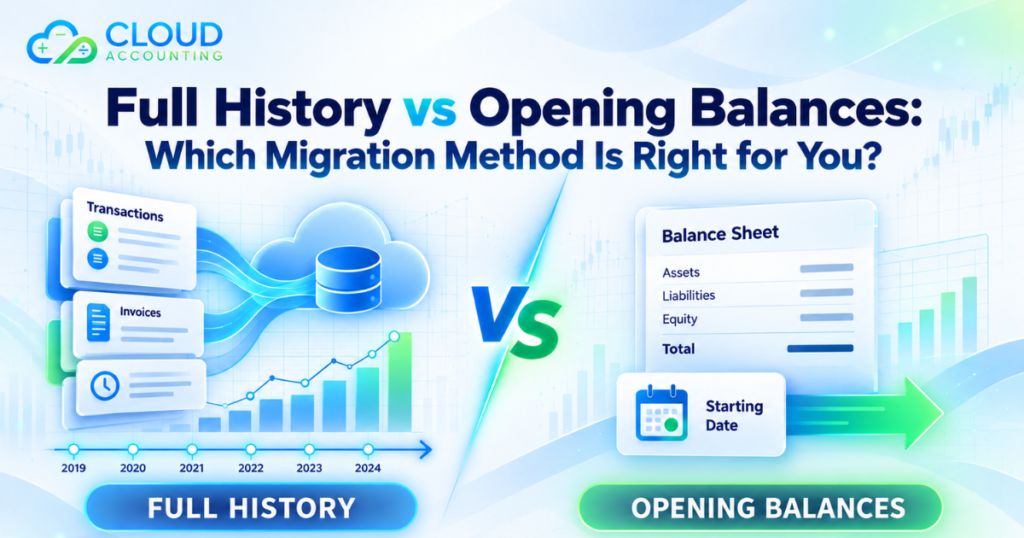
A full history migration involves transferring detailed financial records from your current accounting system into QuickBooks.
The exact scope will depend on the source software, data quality and available export options. A typical full history migration may include:
- Chart of accounts
- Customer and supplier records
- Sales invoices
- Supplier bills
- Credit notes
- Customer and supplier payments
- Bank transactions
- Bank transfers
- Manual journals
- Account balances
- VAT related data
- Outstanding invoices and bills
- Historical financial activity
For example, if you choose to migrate three years of history, the aim is to recreate the agreed financial activity for those three years in QuickBooks.
A full history migration can give your team access to previous transactions, reports and account details without regularly returning to the old software.
What Is an Opening Balance Migration?
An opening balance migration transfers the financial position of the business at an agreed conversion date rather than moving every historical transaction.
The opening balances may include:
- Bank balances
- Customer balances
- Supplier balances
- Fixed asset balances
- Loan balances
- VAT balances
- Payroll liabilities
- Other assets and liabilities
- Retained earnings
- Outstanding invoices
- Outstanding supplier bills
Your previous accounting system remains the main source for reports and transaction details relating to earlier periods.
For example, if your QuickBooks start date is 1 January, the closing balances from the old system as of 31 December may be entered into QuickBooks. New accounting activity is then recorded in QuickBooks from 1 January onwards.
Full History vs Opening Balances at a Glance
| Area | Full History Migration | Opening Balance Migration |
| Historical transactions | Detailed records are transferred | Usually remain in the old system |
| Previous reports | May be available in QuickBooks | Accessed from the previous system |
| Migration time | Usually longer | Usually faster |
| Cost | Usually higher | Usually lower |
| Data preparation | More extensive | More limited |
| Transaction searches | Historical records can be searched in QuickBooks | Earlier details must be found elsewhere |
| Best suited to | Businesses needing continued historical access | Businesses needing a fresh start |
| Validation | Requires detailed checking | Focuses mainly on opening positions |
Benefits of a Full History Migration
Historical information stays accessible
Your team can search previous invoices, payments and transactions from within QuickBooks. This can make it easier to answer questions from customers, suppliers, accountants and auditors.
Reporting can include earlier periods
A full history migration may allow you to compare financial performance across multiple years in QuickBooks. This can help with budgeting, trend analysis and management reporting.
However, reports may not look exactly the same as they did in the source system. Different accounting platforms can process and present information differently.
Less dependence on the previous software
If historical records are available in QuickBooks, you may not need to maintain regular access to the old accounting platform.
You should still keep secure copies of the original data and reports. A migration does not remove your responsibility to retain suitable financial records.
Easier account investigation
Detailed history can help when investigating old balances, customer disputes, supplier queries or unusual transactions.
Limitations of a Full History Migration
It can take longer
More records require more extraction, preparation, mapping, import and checking. Large data volumes or complicated accounting structures can increase the migration time.
It usually costs more
The cost can increase based on:
- Number of years
- Transaction volume
- Number of bank accounts
- Multiple currencies
- Number of business entities
- Data quality
- Source system limitations
- Required attachments
- Inventory or project records
- Custom reporting requirements
Not every record maps directly
Accounting systems are built differently. Some fields, transaction types and features may not have a direct equivalent in QuickBooks.
These areas may require a different structure, summary entries or supporting records outside QuickBooks.
Poor historical data may need correction
A migration does not automatically repair incorrect bookkeeping. Old unreconciled balances, duplicate records and inconsistent account coding may need to be reviewed before or during the project.
Benefits of an Opening Balance Migration
Faster setup
Because fewer records are transferred, the business can often begin using QuickBooks sooner.
Lower migration cost
Opening balance migrations normally require less processing and validation than detailed historical migrations.
A cleaner starting point
The new QuickBooks account can begin with an updated chart of accounts, organised contacts and confirmed opening balances.
This may be useful when the previous system contains outdated records or years of inconsistent bookkeeping.
Less unnecessary data
Some businesses rarely need detailed access to old transactions. In this situation, moving years of information may add cost without providing enough value.
Limitations of an Opening Balance Migration
Previous details remain outside QuickBooks
If you need to review an old invoice, payment or journal, you may have to access the previous software or archived reports.
Historical comparison is limited
QuickBooks will not contain detailed reports for periods before the conversion date unless comparative figures are added separately.
The opening balances must be accurate
An opening balance migration depends on reliable closing figures from the previous system. Incorrect balances can create problems from the first day of using QuickBooks.
Access to old records must be planned
Before cancelling the previous software subscription, you should confirm how historical information will be stored and accessed.
Possible options include:
- Keeping read only access
- Exporting general ledger reports
- Saving trial balances
- Downloading aged debtor and creditor reports
- Exporting VAT reports
- Saving invoice and bill documents
- Keeping complete data backups where supported
Which QuickBooks Migration Option Is Right for You?
Choose full history migration when:
- Your team frequently checks previous transactions
- You need several years of comparative reporting
- Auditors regularly request transaction details
- Customer and supplier queries often involve older records
- You plan to stop using the previous accounting system
- Historical reporting is important for management decisions
- Your existing data is complete and reliable
Choose opening balance migration when:
- You want to begin using QuickBooks quickly
- Your migration budget is limited
- Historical transactions are rarely reviewed
- Previous records can be stored safely elsewhere
- Your old data contains significant errors or duplication
- You want a cleaner accounting structure
- You are moving at the start of a new financial year
Can You Combine Both Migration Methods?
Yes. A combined approach can offer a practical balance between cost and access to information.
For example, you could transfer:
- Full transaction history for the current financial year
- Opening balances for earlier periods
- Outstanding invoices and bills at the conversion date
- Summary monthly journals for comparative reporting
- Key customer and supplier records
This approach can provide useful recent detail without transferring every transaction from previous years.
The migration scope should clearly state which records will be transferred in detail and which will be represented by balances or summaries.
Questions to Ask Before Choosing a Migration Method
Before selecting between the available QuickBooks migration options, consider the following questions.
How often do you use historical data?
If your team regularly searches for old invoices or transaction details, full history may be more practical.
How many years of information do you need?
Legal record retention requirements do not always mean every transaction must be recreated in QuickBooks. You may be able to keep older reports in a secure archive.
Is the source data accurate?
If the existing records contain errors, moving everything could reproduce those problems in QuickBooks. A review may be needed before deciding the scope.
Will you retain access to the old system?
Opening balances may be sufficient if you can keep read only access or export all necessary records before closing the account.
Do you need comparative reports?
If management needs year on year comparisons inside QuickBooks, consider migrating detailed history or agreed monthly summaries.
Are there any complex features?
Review whether the current system uses:
- Multiple currencies
- Inventory
- Projects
- Departments
- Cost centres
- Fixed assets
- Payroll
- Purchase orders
- Custom fields
- System integrations
These features may affect what can be transferred and how the new QuickBooks account should be configured.
What is your target start date?
An opening balance migration may be more suitable when the business needs to start quickly. A full history migration normally requires more time for preparation and checking.
Why the Conversion Date Matters
The conversion date determines where the old system ends and QuickBooks begins.
Common conversion dates include:
- The beginning of a financial year
- The beginning of a VAT period
- The start of a month
- Immediately after year end accounts are completed
Choosing a clear date can reduce duplicated transactions and gaps between the two systems.
Before going live, bank feeds, invoice numbering, VAT settings, user permissions and connected applications should also be reviewed.
How Is Migrated Data Checked?
Regardless of the migration method, the transferred information should be validated.
Common checks include comparing:
- Trial balance totals
- Bank account balances
- Aged receivables
- Aged payables
- VAT balances
- Profit and loss reports
- Balance sheet reports
- Outstanding invoices
- Outstanding bills
- Selected transaction records
The comparison should be completed using reports from the same date and accounting basis. Comparing reports from different dates can create apparent differences that are not genuine migration errors.
Common Mistakes to Avoid
Moving data without agreeing on the scope
The migration scope should clearly explain the years, transaction types, accounts and records included.
Cancelling the old software too early
Do not close the previous account until the migration has been checked and all essential records have been saved.
Assuming every feature will transfer
Some source system features may need to be rebuilt, replaced or managed through a connected application.
Ignoring data quality issues
Duplicate contacts, unreconciled bank transactions and incorrect balances should be identified before they cause problems in QuickBooks.
Migrating more history than the business needs
More data does not always create more value. Historical information should be transferred because it supports a genuine business, reporting or compliance requirement.
How Cloud Accounting Can Help
Cloud Accounting provides professional migration support for businesses moving to QuickBooks.
We can review your existing accounting system, assess the available data and help you compare the most suitable QuickBooks migration options.
Depending on the agreed scope, our migration support can include:
- Source data review
- Migration planning
- Chart of accounts mapping
- Customer and supplier transfer
- Historical transaction migration
- Opening balance setup
- Outstanding invoice and bill transfer
- Bank account configuration
- Data validation
- Post migration checks
- QuickBooks training
Every migration should begin with a clear review of the source system and the records your business genuinely needs.
Final Thoughts
Full history migration provides greater access to previous transactions and reports, but it normally takes more time and costs more. Opening balance migration offers a faster and more affordable start, but historical detail remains outside QuickBooks.
There is no single method that suits every business. The right choice depends on how your team uses historical data, the quality of the current records and how much access you will retain after the move.
A careful assessment before migration can prevent unnecessary costs, missing records and reporting problems later.
Ready to Choose the Right QuickBooks Migration Option?
Speak with Cloud Accounting about your current system, historical data and reporting needs. Our team can assess your requirements and recommend a suitable migration approach for your business.