When planning an accounting software migration, it’s understandable that cost is one of the first things businesses consider. Whether you’re moving from Sage, QuickBooks Desktop, NetSuite, Access Dimensions, Zoho Books, or another accounting platform, you’ll likely receive several quotes that vary significantly in price.
At first glance, choosing the cheapest option may seem like the obvious decision. After all, if every provider promises to move your data from one system to another, why pay more?
The answer is simple: not all accounting migrations are the same.
A professional migration involves much more than exporting data from one system and importing it into another. It requires careful planning, accurate data mapping, financial reconciliation, testing, and post-migration support to ensure your new accounting software works as expected from day one.
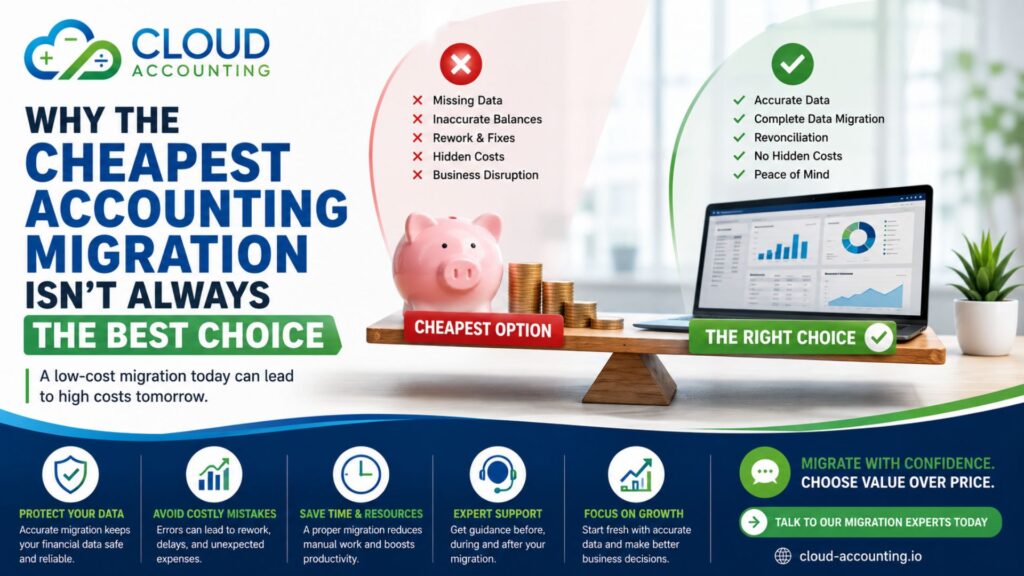
Choosing the cheapest provider may save money upfront, but it can lead to inaccurate financial records, missing historical data, reporting issues, and unexpected costs later.
In this guide, we’ll explain why the lowest-priced migration isn’t always the best choice, what you should look for when comparing providers, and how to choose a migration service that offers real value for your business.
Why Businesses Look for Cheap Accounting Migration
Every business wants to manage its budget wisely.
Moving to new accounting software often involves several expenses, including software subscriptions, implementation, staff training, and migration services. It’s only natural to look for ways to reduce costs.
Many migration providers advertise very low prices to attract customers. While these offers can be suitable for straightforward migrations, they don’t always include everything your business needs.
Instead of asking, “Who offers the cheapest accounting migration?”, ask:
“Which provider offers the best value and the lowest risk?”
A successful migration is an investment in your financial systems. The quality of that investment can affect your business for years.
Price vs Value: Understanding the Difference
Price tells you what you’ll pay.
Value tells you what you’ll receive.
Two providers may both advertise accounting migration services, but the work included can be very different.
For example:
| Cheapest Provider | Professional Migration Specialist |
| Imports opening balances only | Transfers agreed historical data |
| Limited planning | Detailed migration planning |
| No reconciliation | Full financial reconciliation |
| Automated import only | Automated tools plus manual validation |
| Limited support | Dedicated migration support |
| Additional charges for changes | Clear scope and transparent pricing |
The second option may cost more initially, but it often prevents expensive problems after the migration has been completed.
What Does a Professional Accounting Migration Include?
Many businesses assume migration simply involves moving data between two accounting systems.
In reality, a professional migration is a structured project designed to protect your financial information.
Depending on your requirements, a migration may include:
- Chart of accounts
- Customers and suppliers
- Sales invoices
- Purchase bills
- Credit notes
- Historical transactions
- Bank transactions
- Opening balances
- VAT records
- Payroll balances
- Multi-currency data
- Fixed assets
- Tracking categories
- Projects or job costing
- Financial reports
- Data validation
- Financial reconciliation
- Post-migration support
Every migration is different, which is why professional providers spend time understanding your business before recommending an approach.
Why Are Some Migration Quotes So Much Cheaper?
If you’ve requested several quotations, you’ve probably noticed large differences in price.
This doesn’t necessarily mean one provider is overcharging.
It often means the scope of work is different.
Lower-priced services may:
- Transfer opening balances only
- Exclude historical transactions
- Ignore attachments
- Skip reconciliation
- Offer limited testing
- Provide no post-migration support
- Charge extra for changes during the project
A professional quotation clearly explains what is included so there are no surprises later.
The Role of Planning in a Successful Accounting Migration
One of the most overlooked aspects of accounting migration is proper planning. Many businesses assume that migration begins when data is exported from the old system, but in reality, the process starts much earlier. A well-planned migration ensures that potential issues are identified and resolved before they impact your financial data.
Effective planning involves defining the scope of the migration, deciding how much historical data to transfer, and identifying any data that needs cleaning or restructuring. It also includes mapping accounts, tax codes, and reporting structures between systems to ensure consistency. Without this step, even the most advanced migration tools can produce inaccurate results.
Another critical part of planning is setting a realistic timeline. Rushed migrations often lead to errors, incomplete data transfers, and insufficient testing. By allowing enough time for preparation, testing, and validation, businesses can significantly reduce the risk of post-migration issues.
Communication is equally important. A professional migration provider will keep stakeholders informed throughout the process, ensuring that finance teams understand what to expect and when. This helps minimise disruption and ensures a smoother transition.
The Hidden Costs of Cheap Accounting Migration
Saving money at the beginning of a project doesn’t always reduce the overall cost.
If the migration isn’t completed correctly, your business may spend considerably more fixing problems afterwards.
Common hidden costs include:
Missing Historical Data
If only balances are migrated, your previous invoices, payments, and financial history may not be available in your new software.
This can make reporting, customer enquiries, and audits much more difficult.
Incorrect Financial Reports
Incorrect account mappings or incomplete data transfers can affect:
- Profit & Loss reports
- Balance Sheets
- VAT returns
- Customer balances
- Supplier balances
Even small differences can create confusion and require hours of investigation.
Additional Consultancy Fees
Businesses sometimes need specialists to correct migration mistakes after the project has finished.
These costs are rarely included in the original low-priced quotation.
Lost Productivity
If staff cannot rely on the new accounting system, they often spend time checking figures manually instead of focusing on their daily work.
Delayed Business Operations
Problems with invoices, supplier payments, bank reconciliation, or VAT submissions can interrupt normal business activities and affect cash flow.
Common Migration Mistakes That Can Cost Businesses Money
Poorly planned migrations can result in avoidable problems.
Some of the most common include:
- Missing customer records
- Duplicate contacts
- Incorrect VAT codes
- Unbalanced journals
- Incorrect opening balances
- Missing bank transactions
- Duplicate invoices
- Lost attachments
- Incorrect foreign currency balances
- Broken reporting structures
Many of these issues are difficult to identify immediately and may only become apparent weeks or months later.
Why Data Quality Matters Before Migration
Your new accounting software is only as good as the data imported into it.
Many businesses have accumulated years of duplicate contacts, inactive suppliers, unused accounts, or outdated information.
Migrating poor-quality data transfers existing problems into your new system.
An experienced migration specialist reviews your data before migration and recommends improvements where appropriate.
This gives your business a cleaner and more organised accounting system from the beginning.
The Importance of Financial Reconciliation
One of the biggest differences between a basic migration and a professional migration is financial reconciliation.
After the data has been imported, experienced migration specialists compare the financial information in both systems.
Typical checks include:
- Trial Balance
- Balance Sheet
- Profit & Loss
- Accounts Receivable
- Accounts Payable
- Bank balances
- VAT reports
- Opening balances
If any figures don’t match, the cause is investigated before the migration is signed off.
Without reconciliation, businesses may unknowingly rely on inaccurate financial data.
Automation Is Helpful, But Experience Is Essential
Modern migration tools can significantly speed up the migration process.
However, software cannot make business decisions.
Accounting systems often contain:
- Custom chart of accounts
- Industry-specific reporting
- Multi-company structures
- Multi-currency transactions
- Custom tax settings
- Complex journals
- Department reporting
- Tracking categories
Automation transfers information, but experienced consultants ensure it has been transferred correctly.
The best migrations combine powerful migration tools with expert human review.
How to Compare Accounting Migration Quotes
Instead of comparing prices alone, compare the overall service.
Use a checklist like this:
| Comparison Point | Included? |
| Project planning | ✓ |
| Historical data migration | ✓ |
| Opening balances | ✓ |
| Financial reconciliation | ✓ |
| Data validation | ✓ |
| VAT review | ✓ |
| Testing before completion | ✓ |
| Dedicated migration specialist | ✓ |
| Post-migration support | ✓ |
| Transparent pricing | ✓ |
A slightly higher quotation may include services that save your business many hours of work later.
Questions to Ask Before Choosing a Migration Provider
Before accepting a quotation, ask the following questions:
- What data will be migrated?
- Is historical transaction data included?
- Will you reconcile the financial reports?
- How do you validate the imported data?
- Do you provide post-migration support?
- How many similar migrations have you completed?
- Will there be any additional charges?
- How long will the migration take?
- What happens if issues are discovered after the migration?
- Who will manage my project?
Clear answers demonstrate experience and professionalism.
When a Cheap Accounting Migration May Be the Right Choice
A lower-cost migration isn’t always the wrong decision.
It may be suitable if:
- Your business has recently started trading.
- You only need opening balances.
- There is very little historical data.
- Your accounting records are simple.
- You don’t require complex reporting.
However, businesses with several years of financial history, multiple entities, inventory, payroll, fixed assets, or multi-currency transactions usually benefit from a more comprehensive migration service.
Why Experience Matters
Accounting software stores financial information in different ways.
Migrating from Sage to Xero is different from moving NetSuite to QuickBooks Online or Zoho Books to Xero.
An experienced migration specialist understands:
- Data structures
- Tax rules
- Reporting requirements
- Currency handling
- Historical transactions
- Financial reconciliation
- Industry-specific requirements
This knowledge reduces risk and helps ensure a successful migration.
Why Businesses Choose Cloud Accounting
At Cloud Accounting, we believe a successful migration is built on careful planning, technical expertise, and attention to detail.
We work with businesses across a wide range of industries, helping them move to leading cloud accounting platforms with confidence.
Our migration services can include:
- Detailed migration planning
- Data review and preparation
- Historical data migration where required
- Financial reconciliation
- Data validation and testing
- Secure handling of financial information
- Post-migration support
- Guidance on getting the most from your new accounting software
We have experience migrating from a wide range of accounting systems, including Sage, NetSuite, QuickBooks Desktop, QuickBooks Online, Zoho Books, FreeAgent, FreshBooks, Reckon, Microsoft Dynamics, Access Dimensions, Acumatica, MYOB, Pegasus, Aqilla, and many more.
Rather than focusing on being the cheapest provider, we focus on delivering accurate migrations that help businesses continue operating with confidence from day one.
Final Thoughts
Choosing the Cheap Accounting Migration may reduce your initial costs, but it doesn’t always provide the best long-term value.
A successful migration protects your financial data, maintains accurate reporting, minimises disruption, and gives your team confidence in their new accounting software.
Before accepting the lowest quotation, take time to understand exactly what is included, what experience the provider has, and what support will be available after the migration.
Investing in a professional migration today can help you avoid costly corrections, reporting problems, and unnecessary business disruption in the future.
Ready to Migrate with Confidence?
If you’re planning to move to Xero, QuickBooks Online, Zoho Books, FreeAgent, Sage, or another cloud accounting platform, Cloud Accounting is here to help.
Our experienced migration specialists will assess your requirements, explain your options, and recommend the approach that best suits your business. From planning and data preparation to reconciliation and post-migration support, we’ll help you move to your new accounting software with confidence.
Contact Cloud Accounting today for a free consultation and a transparent, no-obligation migration quote.