Moving to a new accounting system is a major decision. Before most businesses begin the process, one question comes up almost immediately:
How much will it cost?
The truth is that there is no single answer. Every business uses its accounting software differently, which means every migration project has unique requirements.
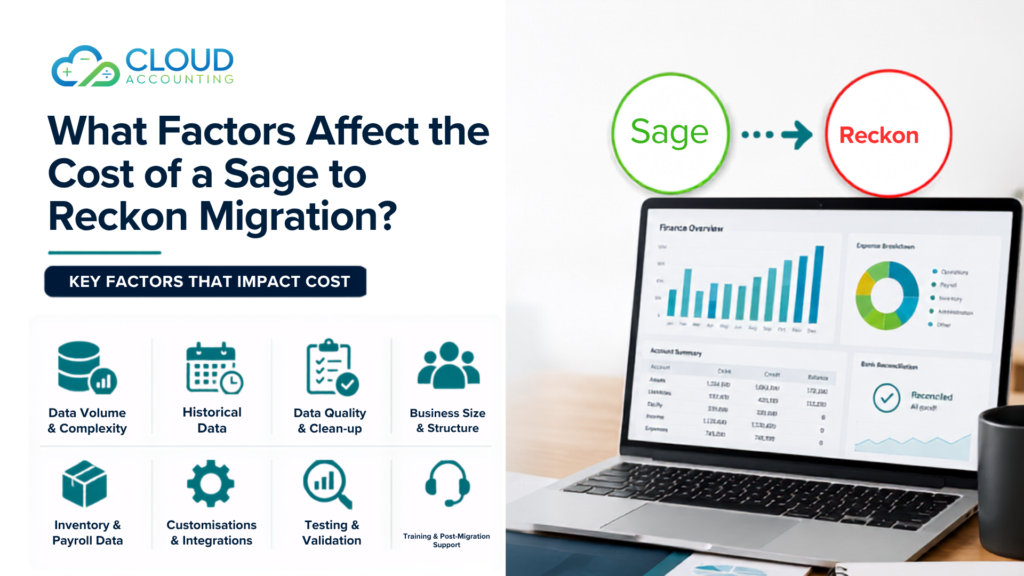
The Sage to Reckon Migration Cost depends on several factors, including the amount of data being transferred, the complexity of your accounting setup, and the level of support required during the transition.
Understanding these factors before starting your project can help you budget more accurately and avoid unexpected expenses later.
Planning a move from Sage to Reckon? Understanding the factors behind the Sage to Reckon Migration Cost can help you avoid surprises and make better decisions from the start.
Why Businesses Move from Sage to Reckon
Some want a platform that better suits their current operations. Others are looking for a different user experience, reporting structure, or pricing model. In many cases, business growth creates new requirements that make a change worthwhile.
What worked well a few years ago may no longer meet the needs of a growing business. As transaction volumes increase and reporting demands become more detailed, companies often begin reviewing whether their current accounting software still supports their goals.
Many businesses move from Sage to Reckon because they want:
- A different accounting workflow
- Easier day-to-day financial management
- Better alignment with their business processes
- Improved reporting capabilities
- Lower software and maintenance costs
- Features that better match their industry requirements
For some organisations, the decision is driven by efficiency. For others, it is about gaining better visibility into financial performance. Whatever the reason, changing accounting software is usually a strategic business decision rather than a simple technology upgrade.
However, moving accounting software is not simply a matter of exporting one file and importing another.
Every accounting system stores data differently. Customer records, supplier information, account codes, tax settings, invoices, payments, and historical transactions must all be reviewed carefully before they can be transferred successfully.
The Amount of Data Being Migrated
One of the biggest factors affecting migration pricing is the volume of data involved.
A business with one year of transactions will usually require less migration work than a company with ten years of financial history.
Data commonly transferred includes:
- Customer records
- Supplier records
- Chart of accounts
- Invoices
- Bills
- Payments
- Credit notes
- Bank transactions
- Historical reports
As the amount of data increases, the migration process becomes more time-consuming.
This directly affects the total Sage to Reckon Migration Cost.
How Much Historical Data Do You Need?
Many businesses assume they need every transaction ever entered into Sage.
In reality, that is not always necessary.
Some companies choose to migrate:
- Current financial year data only
- Two years of history
- Five years of history
- Complete historical records
The more historical data you transfer, the more validation and testing are required.
Older records can also contain inconsistencies that need correcting before migration.
As a result, the amount of historical information being transferred has a significant impact on the Sage to Reckon Migration Cost.
Data Quality and Clean-Up Requirements
Here’s something many businesses discover during migration planning.
The quality of the data often matters more than the quantity.
Over time, accounting systems can accumulate:
- Duplicate contacts
- Old suppliers
- Inactive customers
- Incorrect account mappings
- Unreconciled transactions
- Missing tax information
If these issues exist in Sage, they may also appear in Reckon after migration.
That is why many migration projects include a data review and clean-up stage.
Although this requires additional work, it helps create a cleaner accounting system and can prevent reporting issues later.
The more clean-up required, the higher the Sage to Reckon Migration Cost may be.
The Size and Complexity of Your Business
Not all businesses use accounting software in the same way.
A sole trader typically has much simpler requirements than a company operating across multiple departments or locations.
Larger organisations often have:
- Higher transaction volumes
- More users
- More reports
- More approval processes
- Greater financial complexity
These factors create additional migration requirements and often increase the overall Sage to Reckon Migration Cost.
Single Entity vs Multi-Entity Migrations
A single business entity is usually easier to migrate than multiple entities.
If your organisation manages several companies, subsidiaries, or divisions, each may require separate migration planning and validation.
Multi-entity migrations often involve:
- Separate charts of accounts
- Intercompany transactions
- Consolidated reporting
- Different user permissions
This additional complexity can increase the amount of migration work required and therefore affect the Sage to Reckon Migration Cost.
Sage Version and System Structure
Another factor that businesses often overlook is the version of Sage being used.
Different Sage products have different data structures.
Examples include:
- Sage 50
- Sage Business Cloud
- Sage 200
- Older legacy Sage systems
Some systems allow easier data extraction than others.
Older versions may require additional preparation before migration can begin.
The more work required to extract and prepare data, the greater the potential impact on the Sage to Reckon Migration Cost.
Customisations Within Sage
Many businesses customise Sage to suit their operations.
This can include:
- Custom reports
- Custom fields
- Industry-specific workflows
- Modified account structures
- Unique data categories
These customisations often require additional planning during migration.
Special fields may need mapping, reports may need rebuilding, and workflows may require adjustment inside Reckon.
As customisation increases, so does migration complexity.
This can influence the final Sage to Reckon Migration Cost.
Account Mapping Requirements
Account mapping is one of the most important stages of any migration project.
During this process, accounts in Sage are matched with the correct accounts in Reckon.
While this may sound straightforward, it can become complicated when businesses use:
- Custom account codes
- Department tracking
- Cost centres
- Industry-specific reporting categories
Incorrect account mapping can lead to reporting issues after migration.
Proper planning and validation help avoid these problems but may increase the overall Sage to Reckon Migration Cost.
Inventory Complexity
Inventory is often one of the most challenging areas of accounting migration.
Businesses that manage products must ensure that stock data transfers correctly.
This may include:
- Product records
- Stock quantities
- Inventory values
- Purchase history
- Sales history
- Warehouse information
If inventory is not migrated correctly, businesses may face inaccurate stock levels and financial reporting issues.
The more complex your inventory setup, the greater the effect on the Sage to Reckon Migration Cost.
Payroll Data Requirements
Payroll migration requires careful handling.
Some businesses only transfer current employee records, while others need complete payroll history.
Payroll migration can involve:
- Employee details
- Leave balances
- Payroll transactions
- Tax information
- Superannuation records
The amount of payroll data being transferred can significantly influence the Sage to Reckon Migration Cost.
Third-Party Integrations
Modern accounting systems rarely operate alone.
Many businesses connect Sage with other applications.
Examples include:
- CRM systems
- Ecommerce platforms
- Inventory software
- Payment gateways
- Reporting tools
When migrating to Reckon, these integrations often need reviewing and reconnecting.
Additional integration work can contribute to the total Sage to Reckon Migration Cost.
Industry-Specific Requirements
Different industries have different accounting needs.
Construction Businesses
Construction companies often require:
- Project accounting
- Job costing
- Progress billing
- Contract tracking
Retail Businesses
Retail organisations may need:
- Multi-location inventory management
- Point-of-sale integrations
- Product reporting
Professional Services Firms
Professional service businesses frequently rely on:
- Time tracking
- Resource allocation
- Project profitability reporting
Industry-specific requirements often add complexity to migration projects, which can affect the final Sage to Reckon Migration Cost.
Data Verification and Testing
Migration is not finished when the data arrives in Reckon.
The most important phase often comes afterwards.
Testing typically includes reviewing:
- Opening balances
- Customer balances
- Supplier balances
- Bank accounts
- Tax reports
- Financial statements
- Inventory values
This process helps ensure that records match between systems.
Comprehensive testing protects businesses from costly reporting errors and plays an important role in determining the Sage to Reckon Migration Cost.
Migration Timeline and Urgency
Sometimes businesses need migration completed quickly.
This may happen because of:
- Financial year-end deadlines
- Internal projects
- Business acquisitions
- Software contract expirations
Urgent projects often require additional resources and prioritisation.
As a result, tight deadlines can increase the overall Sage to Reckon Migration Cost.
Training and User Support
The migration itself is only part of the journey.
Employees also need to feel confident using the new system.
Many businesses include:
- User training
- Report setup guidance
- Workflow support
- Troubleshooting assistance
- Post-migration reviews
These services help teams adapt more quickly and can influence the total Sage to Reckon Migration Cost.
Hidden Costs Businesses Often Overlook
Many organisations focus solely on migration fees.
However, there can be other costs associated with the project.
These may include:
- Staff training time
- Process updates
- Internal testing
- Report redesign
- Integration reconfiguration
- Temporary productivity impacts
Considering these factors provides a more realistic understanding of the true Sage to Reckon Migration Cost.
How to Reduce Your Sage to Reckon Migration Cost
The good news is that businesses can take steps to reduce migration costs before the project begins.
Helpful actions include:
- Removing duplicate contacts
- Archiving inactive records
- Reconciling accounts
- Cleaning inventory data
- Reviewing historical transactions
- Deciding how much history needs migrating
The cleaner your data is, the less preparation work may be required.
This can help lower the overall Sage to Reckon Migration Cost while improving migration accuracy.
Questions to Ask Before Requesting a Migration Quote
Before contacting a migration provider, it helps to gather key information about your current setup.
Ask yourself:
- How many years of data need migrating?
- Do we require inventory history?
- Is payroll data required?
- How many users will access Reckon?
- Do we use third-party integrations?
- Are custom reports involved?
- Do we operate multiple entities?
Answering these questions helps providers produce a more accurate estimate of your Sage to Reckon Migration Cost.
Why the Cheapest Migration Quote Isn’t Always the Best Option
It’s natural to compare prices when choosing a migration provider.
However, migration quality is often more important than the initial quote.
Imagine discovering after migration that:
- Customer balances are incorrect
- Inventory values don’t match
- Tax reports contain errors
- Historical transactions are missing
Fixing these issues later can be expensive and disruptive.
That is why businesses should focus on expertise, testing, support, and accuracy rather than price alone.
A successful migration provides long-term value and helps ensure your Sage to Reckon Migration Cost delivers a strong return on investment.
How Cloud Accounting Helps Businesses Migrate with Confidence
At Cloud Accounting, we understand that every migration project is unique.
Our team helps businesses evaluate their requirements, prepare data, and manage the migration process carefully from start to finish.
Our approach includes:
- Migration planning
- Data review and preparation
- Data migration
- Validation and reconciliation
- User support
- Post-migration assistance
This helps businesses understand their expected Sage to Reckon Migration Cost while reducing risks throughout the project.
Final Thoughts
The Sage to Reckon Migration Cost depends on many factors, including data volume, historical records, inventory requirements, payroll data, customisations, integrations, and testing needs.
No two businesses are exactly alike, which is why migration pricing can vary significantly.
Taking time to understand these factors before starting your project can help you budget more accurately and make better decisions.
Most importantly, a successful migration is not about moving data as cheaply as possible. It is about ensuring your financial information arrives accurately, your reports remain reliable, and your team can continue working with confidence.
Get a Tailored Sage to Reckon Migration Quote
Planning a move from Sage to Reckon?
Cloud Accounting can help you assess your requirements, identify potential challenges, and provide a clear migration plan tailored to your business.
Contact Cloud Accounting today for a personalised Sage to Reckon migration assessment and cost estimate.