As companies grow, many discover that MYOB can no longer keep up with their evolving needs. While MYOB is excellent for smaller firms, its limitations become clear as operations expand, especially for those managing multiple locations or dealing with complex inventory.
That’s where MYOB to NetSuite Migration becomes vital. NetSuite, as a true cloud ERP, offers integrated financials, inventory, CRM, and supply chain tools. It enables decision-makers to run their business on real-time insights instead of juggling spreadsheets and disconnected systems.
In today’s competitive environment, businesses need scalability and accuracy. Moving from MYOB to NetSuite is not just a technical upgrade it’s a strategic decision to future-proof your operations.
MYOB vs NetSuite: Key Differences You Should Know
Before diving into a MYOB to NetSuite Migration, it’s important to understand how these platforms differ.
- MYOB:
- Best suited for small businesses with basic bookkeeping.
- Handles payroll, invoicing, and local compliance well.
- Limited multi-entity, inventory, and automation features.
- Best suited for small businesses with basic bookkeeping.
- NetSuite:
- A full ERP for growing and global businesses.
- Offers advanced financial management, supply chain, and CRM.
- Real-time dashboards, automation, and consolidated reporting.
- Built to handle multi-entity and multi-currency operations.
- A full ERP for growing and global businesses.
MYOB vs NetSuite differences make it clear why scaling businesses choose NetSuite. A business operating across multiple warehouses or regions can’t rely on basic accounting software NetSuite provides the single source of truth needed for long-term success.
Common Challenges in MYOB to NetSuite Migration
Despite the benefits, a MYOB to NetSuite Migration comes with hurdles. Poor planning can cause errors, compliance risks, and costly downtime.
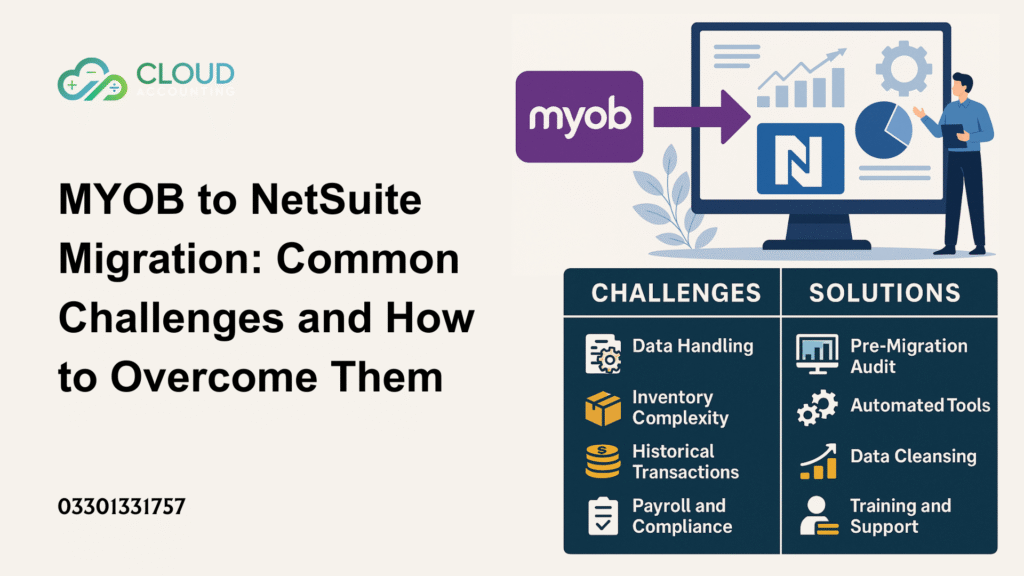
Here are the biggest MYOB migration challenges:
- Multi-location data handling: Migrating data from several business units or warehouses requires careful mapping.
- Inventory complexity: Businesses with hundreds or thousands of SKUs risk mismatched stock levels if migration is rushed.
- Historical transactions: Years of invoices and bills need to be validated, not just transferred.
- Payroll and compliance: Errors in employee records or tax data can cause financial penalties.
- Reporting structures: MYOB’s limited reporting doesn’t directly translate into NetSuite dashboards.
Data Conversion Complexities in Migration
One of the most resource-heavy parts of a MYOB to NetSuite Migration is data conversion. Clean data is the backbone of successful ERP adoption.
Challenges in data conversion in NetSuite include:
- Chart of accounts restructuring: NetSuite uses a different hierarchy. Aligning MYOB’s accounts with NetSuite requires planning.
- Customer/vendor records: Contact details, payment terms, and credit histories must be accurate.
- Open and historical transactions: Invoices, bills, and journals should be brought across without duplication.
- Tax and compliance data: VAT/GST details must be correctly mapped to NetSuite’s tax engine.
- Payroll records: Sensitive data must be migrated securely to maintain compliance.
Many businesses underestimate the complexity of these steps. Without automated validation tools, errors can creep into live environments—impacting financial reports and decision-making.
Inventory Migration to NetSuite: Special Challenges
For product-driven businesses, inventory is often the toughest part of a MYOB to NetSuite Migration.
Challenges include:
- Transferring serial and batch numbers accurately.
- Migrating multi-warehouse stock without duplication.
- Ensuring stock adjustments and landed costs align.
- Rebuilding bills of materials (BOMs) for manufacturers.
A poorly executed inventory migration to NetSuite can result in:
- Inaccurate stock levels.
- Reporting discrepancies.
- Delayed order fulfillment.
- Customer dissatisfaction.
To avoid this, we run test migrations of inventory data, reconciling balances between MYOB and NetSuite before the final cutover.
How Cloud Accounting Overcomes Migration Challenges
At Cloud Accounting, we’ve guided many businesses through a successful MYOB to NetSuite Migration. Our role is to remove uncertainty and deliver a system that’s ready for growth.
Our proven process includes:
- Pre-migration audit: Assess data quality and identify problem areas.
- Data cleansing: Remove duplicates, fix errors, and validate before moving.
- Automated migration tools: Reduce manual work and human error.
- Trial migrations: Run test conversions to catch issues early.
- Validation reports: Compare MYOB and NetSuite data for accuracy.
- Training and support: Ensure finance teams are confident with new workflows.
This hands-on approach ensures that NetSuite implementation is more than just a technical project—it’s a business transformation.
Is Now the Right Time for Your Business?
Timing matters in ERP projects. A MYOB to NetSuite Migration is often the right move if you:
- Struggle with manual workarounds in MYOB.
- Have expanded into multiple locations.
- Rely on spreadsheets to manage inventory or reporting.
- Need consolidated financials across subsidiaries.
- Are preparing for international expansion.
If these signs sound familiar, delaying migration could hold your business back from its next stage of growth.
Case Example: From MYOB Pain to NetSuite Power
A mid-sized wholesale distributor in Australia faced challenges with MYOB. Their inventory accuracy was falling below 85%, leading to delays and lost sales. Reports took days to compile, and payroll compliance was becoming a headache.
With our help, they completed a MYOB to NetSuite Migration in under 90 days. Today, they:
- Run real-time inventory reports.
- Consolidate accounts across three entities.
- Generate compliance-ready payroll reports instantly.
- Use NetSuite dashboards to make faster decisions.
This transformation shows the tangible benefits of upgrading.
FAQ: MYOB to NetSuite Migration
1. Why should I consider a MYOB to NetSuite Migration?
A MYOB to NetSuite Migration is recommended when your business outgrows MYOB’s basic functionality. If you’re dealing with multiple entities, complex inventory, or international operations, NetSuite provides advanced ERP tools, automation, and real-time reporting that MYOB cannot offer.
2. How long does a MYOB to NetSuite Migration take?
The timeline depends on data size, complexity, and integrations. On average, a standard MYOB to NetSuite Migration can take 8–12 weeks. Large enterprises with multi-location setups may require longer, especially if extensive testing and training are included.
3. What data can be moved during MYOB to NetSuite Migration?
Most financial and operational data can be transferred, including:
- Chart of accounts
- Customer and supplier records
- Invoices, bills, and journals
- Payroll and compliance records
- Inventory data (with serial and batch numbers)
The success of migration depends on thorough data cleansing and validation before go-live.
4. What are the main challenges of MYOB to NetSuite Migration?
The biggest challenges include inventory migration, historical data accuracy, and payroll compliance. Businesses often underestimate the effort required to restructure accounts and validate records. Partnering with specialists reduces these risks and ensures a smooth transition.
5. How can Cloud Accounting help with MYOB to NetSuite Migration?
Cloud Accounting provides end-to-end support, from pre-migration audits and data cleansing to testing, validation, and post-go-live support. With proven migration frameworks, we ensure your MYOB to NetSuite Migration is accurate, efficient, and aligned with your growth goals.
Take the Next Step with Cloud Accounting
A MYOB to NetSuite Migration isn’t just about moving data it’s about equipping your business with the tools to thrive. With expert planning, data accuracy, and ongoing support, your move to NetSuite can unlock efficiency, visibility, and scalability.
Cloud Accounting has the expertise to make your migration smooth and secure. Don’t let legacy systems slow your growthget in touch today to start your journey.
Book your consultation now and take the first step toward a future-ready NetSuite setup.